
New feature
AI Story Builds Chapters For You
AI Story now takes a long recording and turns it into a complete, chaptered edit in one pass, built to the length and shape you ask for.
What It Is
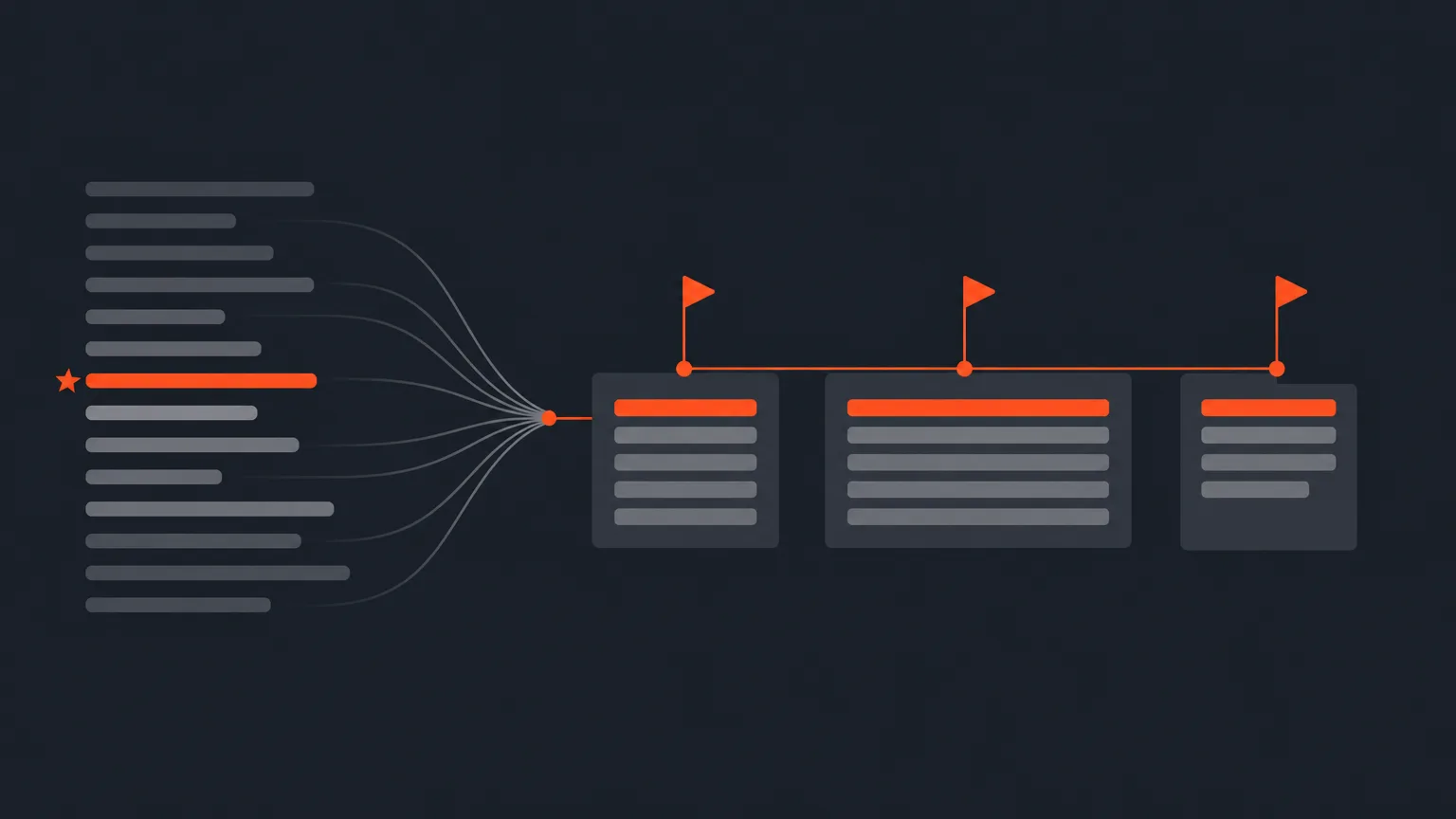
AI Story reads your transcript, picks the best lines, orders them into a story, trims sentences, and can add a cold-open hook. On Short Form it builds one self-contained story. On Long Form it works outline-first: it designs a chapter outline of 3 to 7 titled chapters with time budgets, then fills each one. You land on Arrange with those chapters already built as titled groups.
The Problem It Removes
Turning three hours of raw footage into a shaped edit usually means hours of scrubbing, note-taking, and guessing at structure before you even start cutting. AI Story does that first pass for you, so you open Arrange with a story already in place instead of a blank timeline and a pile of clips.
Write Your Own Structure
You are not stuck with whatever structure the AI picks. Write your chapters into the prompt, a 'director's brief', and AI Story builds exactly those sections, in the order you wrote them, even if the recording covered the topics in a different order. Say 'equal weight' and the chapters come out roughly even. Give one a specific time, like 'Act 2: 2 minutes', and it holds that budget without letting another act eat into it. If a chapter has thin material, AI Story keeps it as is and tells you, rather than padding it with off-topic lines.
Example: you're cutting a documentary about a coffee brand. You write 'Act 1: intro to the business. Act 2: their history and challenges. Act 3: their top products, equal weight.' AI Story builds those three named groups in that order, each close to the same length, even though the founder talked about products before history in the actual interview.
Fine Control, Still Yours
- Star any line as a favorite and it is always kept, never dropped, in the AI's picks.
- Set the cutting style, Natural flow, Balanced, or Tight, to control how many small interior cuts land inside a kept line.
- Turn on 'Don't include Interviewer' so the AI reads questions for context but never uses the interviewer's own lines in the finished result.
- Rename, reorder, or delete any chapter group on Arrange, and use 'Rebuild with AI' on a single chapter to re-pick just that one without touching the rest.
Every chapter also exports as a named range marker into your timeline, so your editor sees the same structure in Premiere or Resolve.
Who This Helps
Anyone starting from a long, unscripted recording: documentary editors shaping chapters, podcast producers cutting a long episode into segments, agencies turning brand interviews into structured content, and marketers who need a story built to a brief instead of a vague first cut.
Try It
If your account has no AI plan yet, you get one free run of AI Story to see the whole thing on your own footage. Open a project in ScriptCut and give AI Story a brief.
frequently asked questions
No. Without a written structure, Long Form AI Story designs its own outline of 3 to 7 chapters, and Short Form builds one self-contained story.
AI Story keeps the chapter and tells you material is thin instead of stretching it out with lines that don't belong there.
Yes, on Arrange you can rename, reorder, or delete any chapter group like any other group, and each one exports as a named marker to your timeline.
No, a starred line is always kept by AI Story and can never be dropped or deselected.
Natural flow makes the fewest interior cuts inside a kept line for the smoothest sound, Tight makes the most for a punchier feel, and Balanced sits in the middle. It only changes how a line is trimmed, not how much.
If your account has no AI plan, you get one free run of AI Story, and it covers the whole job even though it makes several calls behind the scenes.
Yes, it now works identically: the interviewer's questions are read for context but never appear in the finished result.
Start selecting.

Pick the story in the transcript, export a finished rough cut.
Get the ScriptCut newsletter
Thanks! Check your inbox to confirm.
Something went wrong. Please try again.