
New feature
Timecoded Comments On Approval Links
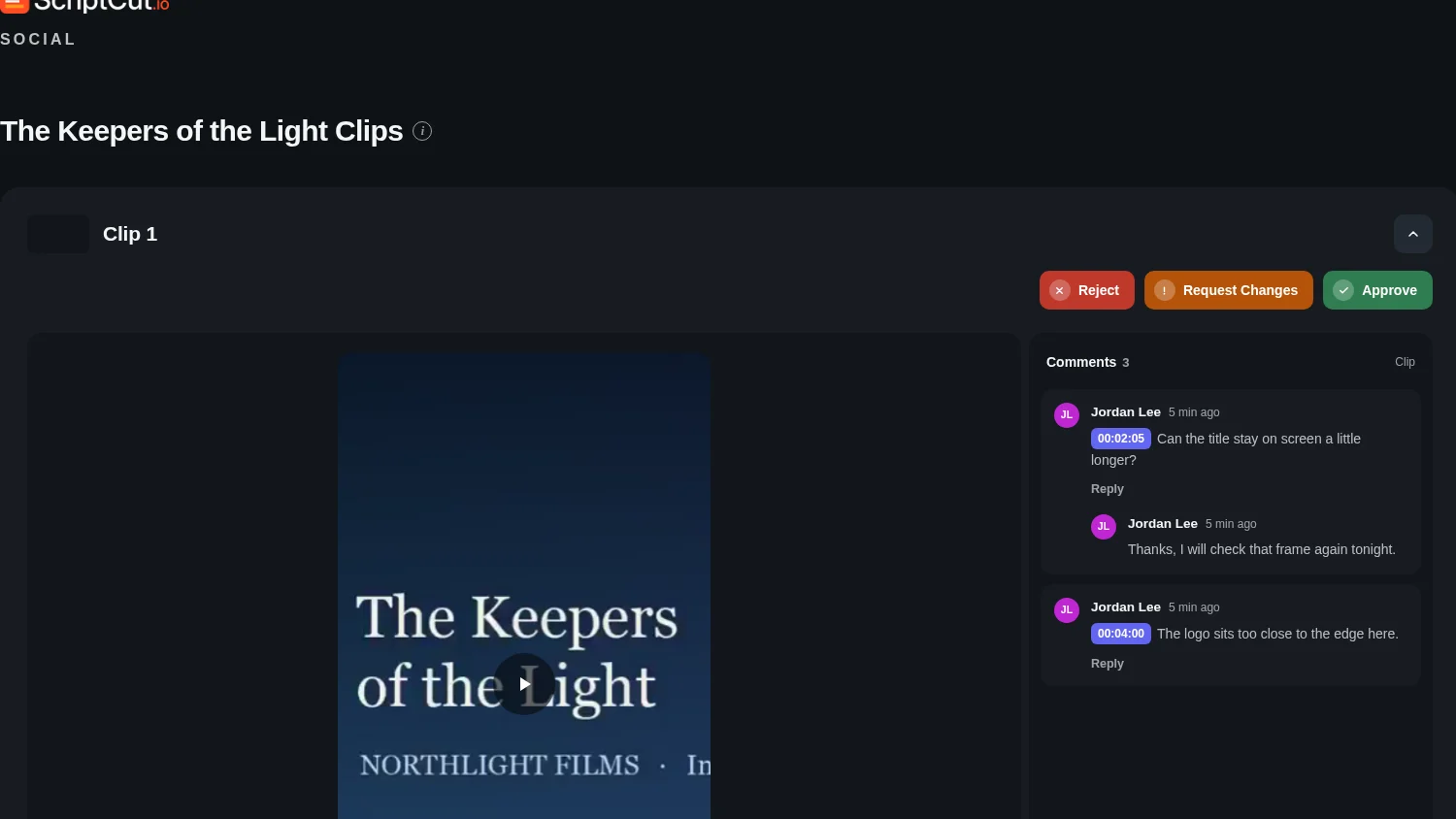
On your Social approval links, clients can now pause any clip and drop a comment on that exact frame, so you always know precisely what moment they mean.
Comments On The Frame
When a client watches a clip on the Approval Page or the Kit Page, they can pause at any point and leave a comment there. The comment carries that exact timecode. Clicking it later jumps straight back to that moment in the video, for you and for them.
There's no separate button for requesting a change. The comment itself is the request. You get notified as soon as they leave one.
One Example
Say an agency sends a client three cuts of a product launch video. The client watches the second clip, pauses right as a line of dialogue lands awkwardly, and types a comment there instead of describing the timestamp in an email. When the editor opens the project later, clicking that comment jumps the player back to the exact second the client meant.
Threads And Replies
Comments thread, so a client can leave a note and you can reply underneath it, right in the conversation. You answer from the project's Client approval window. Your reply is saved on the project's own approval record, so the client sees the same answer whether they're looking at the Approval Page or the Kit Page.
On a clip prepared for more than one platform, a comment on the video itself is shared across every platform it's posted to. A comment on a cover or a description belongs to just that one platform.
Who This Helps
This helps anyone who sends clips out for approval and gets notes back that are vague about timing: an agency collecting feedback from a brand, a podcast host checking clips with a producer, a video editor waiting on a client's sign off before cutting the final version. Instead of translating 'the part where she laughs' into a timestamp yourself, the comment already points at it.
Try it on your next round of clips in ScriptCut.
frequently asked questions
On the Approval Page inside a project, or on the Kit Page that covers everything in a kit. Both use the same clip card.
Yes, you're notified as soon as they leave a comment.
You reply from the project's Client approval window. Your answer is saved on the project's approval record, so it shows up the same way on both the Approval Page and the Kit Page.
No. The client's comments are how they ask for a change, there's no separate request-a-change button.
A comment on the video itself is shared across every platform the clip is prepared for. A comment on a cover or a description applies only to that one platform.
Yes, clicking any comment jumps the player back to the exact frame it was left on.
No, the client doesn't need an account. They just type their name once on the link.
More Product updates
Start selecting.

Pick the story in the transcript, export a finished rough cut and ready to post short form video.
What are you looking for?
Get the ScriptCut newsletter
Thanks! Check your inbox to confirm.
Something went wrong. Please try again.