
Improvement
One Selection Bar, Every Action
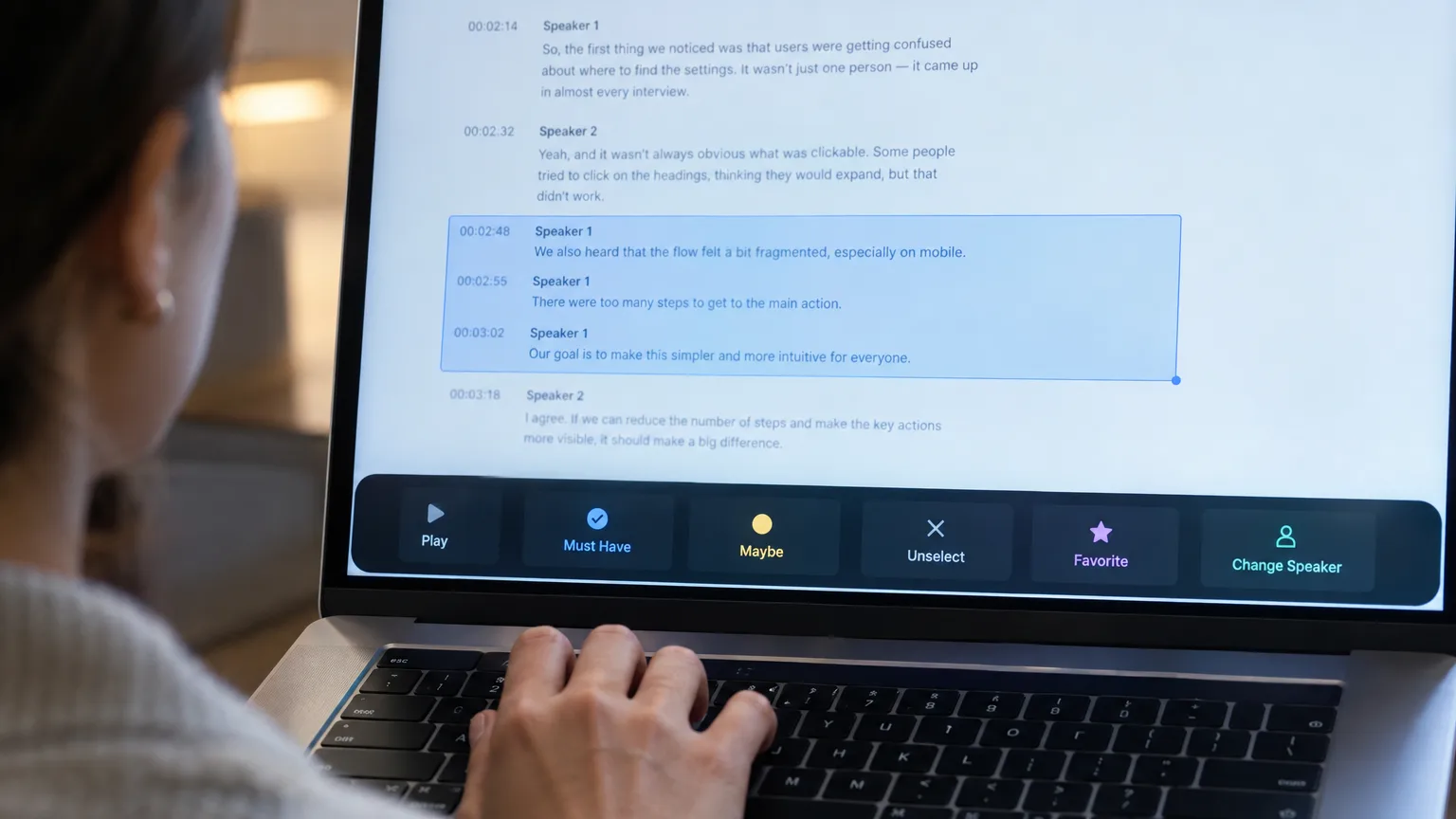
Highlight any lines on Cleanup, Select or Arrange and a floating bar appears with every action you need for that selection, side by side.
What changed
Before, acting on a line meant hunting for the right button or menu. Now you drag a box across one or more lines on Cleanup, Select or Arrange, and a bar appears at the bottom of the screen with the actions that apply there. Cancel clears the highlight and you start again.
What's in the bar
- On Select: Play selected, Must Have, Maybe, Unselect, Favorite, Change Speaker.
- On Arrange: Play selected, Group selected, Deselect.
- On Cleanup: Play selected (always plays every selected line), Keep (after AI Cleanup), Change Speaker, Merge, Reset to original, Delete.
Press F to favorite or unfavorite the selected lines on Select and Arrange, no need to touch the bar at all.
Why it matters
Say you're going through a long interview on Cleanup and the AI has flagged a run of filler lines. Instead of opening each line on its own, you drag across all of them and hit Delete once from the bar. Or on Select, you highlight the five lines that make your strongest point, tag them Must Have, and favorite them with F so they're easy to find later when you build the story.
Who this helps
Anyone working through a long, unscripted recording, a podcast episode, a documentary interview, a panel, a vlog, or hours of UGC. The bar cuts down the clicks between deciding what a line is worth and doing something about it, which matters most when you're triaging dozens of lines at once.
Try it on your next transcript in ScriptCut.
frequently asked questions
Cleanup, Select and Arrange all show the floating selection bar once you highlight one or more lines.
Drag a box across the lines you want, and the bar appears at the bottom with the actions available for that screen.
On Select and Arrange, pressing F favorites or unfavorites whatever lines are currently selected, without opening the bar.
On Cleanup, Play selected always plays every line in your selection; on Select and Arrange it plays the selected lines as well.
Cancel clears your current highlight so you can start a new selection.
Yes, each screen shows only the actions that make sense there, for example Merge and Reset to original only appear on Cleanup.
Start selecting.

Pick the story in the transcript, export a finished rough cut and ready to post short form video.
What are you looking for?
Get the ScriptCut newsletter
Thanks! Check your inbox to confirm.
Something went wrong. Please try again.