
How to Batch Edit a Full Podcast Season
The math
Why episode 14 takes as long as episode 1 if nothing changes
If every episode starts from a blank timeline, the editing time per episode never drops, no matter how many you've cut. A 40-episode season edited one-off, at even a conservative 3 hours per episode, is 120 hours of work that mostly repeats the same podcast editing setup, the same intro build, the same export settings, the same client back-and-forth. Batch editing isn't a trick. It's building the repeatable parts once and only doing the unique part, the actual story of that episode, per episode. The same logic is what drives any broader push to speed up a video editing workflow, not just a podcast season.
Libsyn and other podcast hosting platforms report that shows publishing on a fixed weekly cadence retain listeners better than shows with irregular gaps, which is one more reason a season needs a repeatable pipeline rather than 40 separate improvisations.
The template
Build the season's shell once, before episode one is cut
Before touching raw audio for episode one, lock: the intro and outro sequence, the lower-third and title-card graphics, the audio processing chain (noise reduction, EQ, compression, loudness target), and the export preset. Duplicate that project file for every episode in the season instead of rebuilding any of it. This single step is where most of the time savings live, because it removes forty repeated decisions and replaces them with one.
For a look at how this same idea scales across an entire show, not just one episode, this walkthrough on building a scalable podcast workflow covers the same ground.
File structure
A naming system that still makes sense at episode 40
Use one folder per episode inside a season folder, with a consistent prefix: S03E01_RawAudio, S03E01_Transcript, S03E01_Export. Consistent naming matters more at scale than it does for a single episode, because at episode 30 you are searching, not remembering. The same structure holds up whether the raw files come from a studio recorder or from Zoom recordings, since the folder logic doesn't care where the audio originated.
Audio pass
Clean and normalize before anyone opens a timeline
Run noise reduction and loudness normalization across the whole season's raw files before editing starts, not episode by episode as you go. The EBU R128 loudness standard and its US counterpart both point most podcast audio to roughly -16 LUFS for audio-only feeds and -14 LUFS for video podcasts distributed to YouTube and social. Doing this in one batch pass, rather than fixing levels per episode later, is where a season either sounds consistent or doesn't.
Cutting at scale
Reading transcripts instead of scrubbing forty timelines
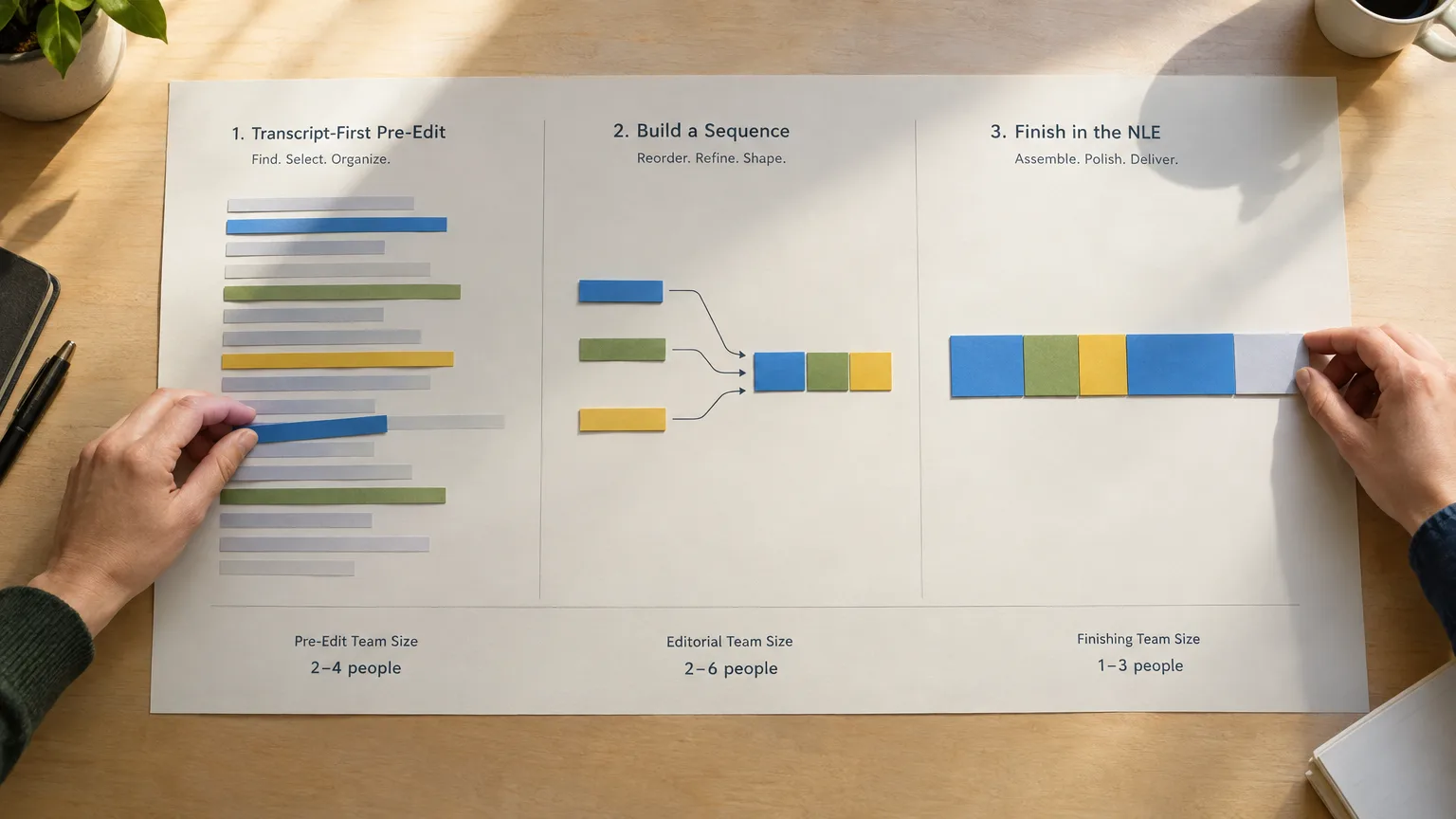
Once every episode has a word-level timecoded transcript, the cut becomes a reading exercise: mark the tangents and dead air on the page, not by ear. This is the same principle behind text-based editing, and it is the step that scales worst without a transcript, because scrubbing audio by hand takes roughly the same wall-clock time on episode 40 as it did on episode 1. Reading a transcript does not carry that same tax, since marking a passage on a page is faster than cueing, playing, and re-cueing the same passage in a waveform.
The transcript-first workflow for a single interview is the same mechanic, just multiplied by however many episodes are in the season.
Finishing in bulk
Captions, chapters, and thumbnails, done as one pass across the season
Generate captions and chapter markers from the transcript for the whole season in one sitting rather than per episode. Most captioning tools accept a batch of SRT exports; most podcast hosts accept chapter markers as a single JSON or ID3 pass. Doing this per-episode as each one finishes means re-learning the export settings 40 times instead of once. The same transcript that drives the season's cut is also what makes it realistic to turn each episode into clips for social, since the marked passages are already timecoded and ready to pull.
Delivery
Lock the export pipeline before episode one, not after episode ten
Decide the final export spec (codec, resolution, loudness target, subtitle format) before cutting starts, and bake it into the template from the file-structure step. Changing the delivery spec mid-season means re-exporting everything already finished, which erases whatever time the batch approach saved.
Where it breaks
The two mistakes that undo a batch workflow
- Skipping the template step to "just get started." The first episode without a template takes the same time it always did, and every episode after it inherits the inconsistency.
- Letting file names drift. One episode named differently from the rest breaks any batch export or search that assumes a consistent pattern.
A season built on this system is portable, too: because the structure lives in the template and the transcript, another editor can pick up episode 23 without a handoff call, which is the same reason agencies standardize a pre-edit step across a whole team, not just a season.
Sources
frequently asked questions
It means building the repeatable parts of an episode, intro, graphics, audio chain, and export preset, once as a template, then duplicating it for every episode instead of rebuilding those pieces each time.
Most of the savings come from removing repeated setup decisions across a season; the exact hours depend on episode length and format, but the template step is where the time is recovered.
An intro and outro sequence, lower-third and title graphics, a locked audio processing chain, and a final export preset, all built once before episode one is cut.
Roughly -16 LUFS for audio-only podcast feeds and -14 LUFS for video podcasts distributed to YouTube and social, based on common industry loudness guidance.
It turns finding the cuts into a reading task instead of a listening task, so marking selections on the page replaces repeatedly scrubbing and re-cueing a waveform by ear.
Skipping the template step to start cutting sooner. The first untemplated episode takes as long as it always did, and every episode after it inherits the inconsistency.
You might also like...









Start selecting.

Pick the story in the transcript, export a finished rough cut and ready to post short form video.
What are you looking for?
Get the ScriptCut newsletter
Thanks! Check your inbox to confirm.
Something went wrong. Please try again.